- front page
- Recommended Article
- Information Technology
- Top 10 Free Keyword Tools in Taiwan 2026 | Quickly Find Keywords with Good Rankings
Top 10 Free Keyword Tools in Taiwan 2026 | Quickly Find Keywords with Good Rankings
dateMay 15, 2025
updateMay 15, 2025
authorEvelyn
Page views:17070

Image Source: Canva
Keyword research is a crucial core element of effective SEO and content marketing. However, the words users actually search for are often completely differ
What are keywords? Can they affect Google rankings?

Simply put, keywords are the search terms that users enter into a search engine. "steak," "sauerkraut and pork hot pot recipe," and "what is SEO" are all keywords that users might search for.
Google compares the web pages on the internet based on the words entered by the user to see which page best meets the user's needs. When your website content contains correct and valuable "keywords", Google can more easily understand what your content is about, and there is a greater chance that your page will rank higher and be seen by more people.
<Further Reading: Can Keyword Ranking Be Guaranteed? Is Guaranteed Keyword Ranking Just a Sales Pitch? >
<Further Reading: How to Choose SEO Keywords? Selection Techniques Revealed! Marketing Companies Do It This Way! >
Keyword Tools 1. Google Search Engine
- The simplest and most intuitive source of keywords
- Free to use
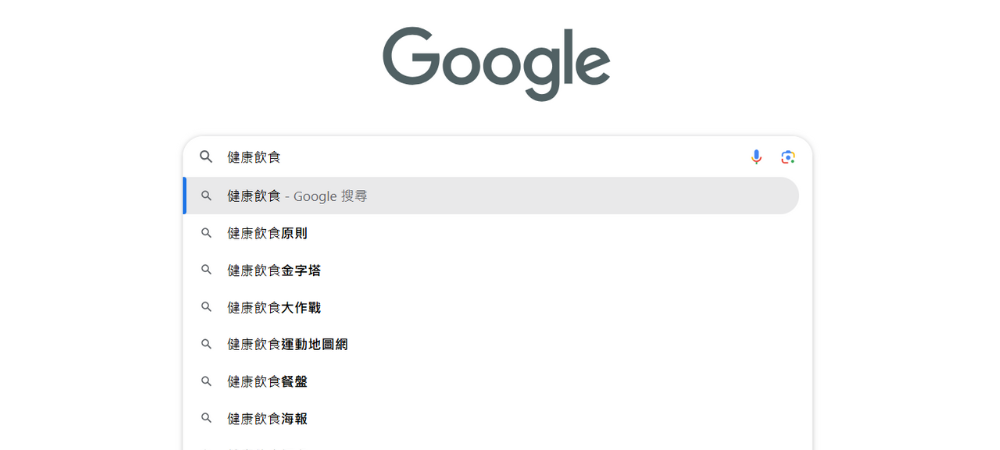
Google is the world's most widely used search engine and arguably the most basic and practical keyword research tool. Its biggest advantage is its ease of use, making it accessible to anyone.
Simply enter your core keywords in the search box, and Google will automatically display the most common related search suggestions in the drop-down menu. These keywords are generated based on the actual search behavior of a large number of users, making them highly valuable. For example, when you enter "healthy eating," you might see related suggestions such as "healthy eating plate" and "healthy eating principles."
Another is the "Related Searches" section at the bottom of the search results page. The keyword strings displayed here are also based on real data generated by user behavior. Although Google does not provide specific search volume data, the keywords that are selected and displayed usually represent a certain level of search popularity.
Keyword planning tool features:
- Try entering partial keywords, such as "recommended," "what is it?", etc., to get broader keyword suggestions.
- The suggested results may differ depending on the device used for the search, such as a mobile phone or a computer.
- Pay attention to the "Others also searched for" section in the search results; these are excellent long-tail keywords.
Keyword tools 2. Communities, news media and forums
- Discover the latest trends and popular keywords
- Free to use
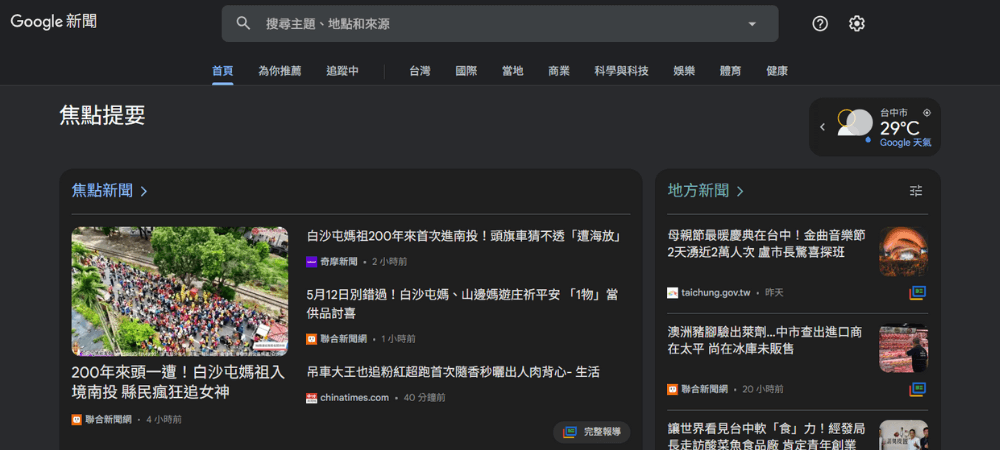
Social media, news websites, and forums are often the front lines for grasping the latest trends and hot topics. These platforms not only reflect the most popular discussion topics at present, but also let you know the most real needs and pain points of the target audience at this moment.
Large forums like PTT and Dcard are excellent sources for observing the interests of specific communities. You can follow sections related to your industry and observe which topics generate the most discussion and engagement. Similarly, Facebook groups, trending hashtags on Twitter, and discussions on LinkedIn can provide a wealth of keyword inspiration.
News media can help you capture seasonal trends and breaking news topics. When a topic starts to appear frequently in the news, the search volume for related keywords often increases. For example, during the pandemic, the search volume for keywords related to "home workouts" exploded.
Keyword planning tool features:
- Use monitoring tools to track the frequency of specific keywords appearing on these platforms.
- Pay attention to the wording and questioning style in the discussion thread; these are often the keywords that users are actually searching for.
Keyword tool 3. Google Trends Search Trends
- Quickly grasp changes in keyword popularity
- Use for free ( Go now )
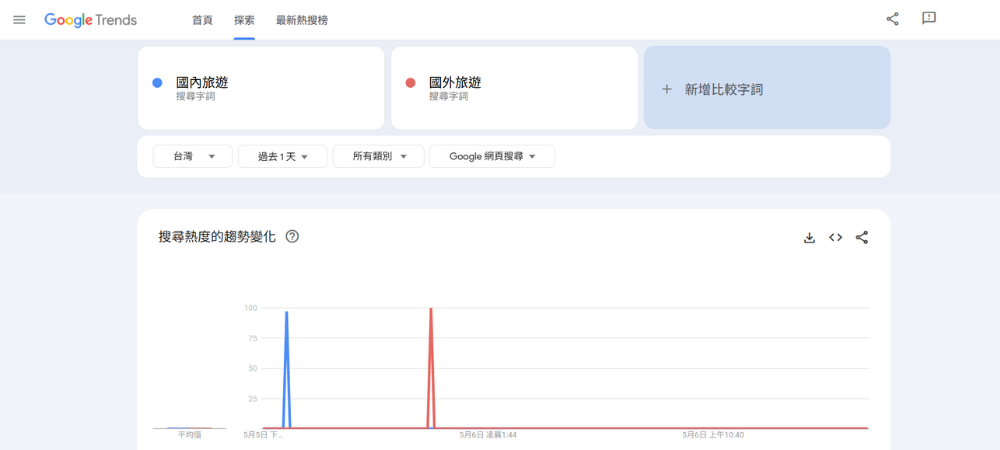
Google Trends is a free online tool provided by Google, specifically designed to analyze keyword search trend changes. Want to know what's hot right now? Trends can show the relative popularity of keywords over time, letting you know which topics are gaining popularity and which are fading away. For websites that need keywords related to current events and trending topics, this is an indispensable keyword analysis tool.
Keyword planning tool features:
- Analyze seasonal trends, such as holiday-related products or services (barbecue during the Mid-Autumn Festival, gift-giving on Mother's Day).
- Compare the relative popularity of multiple related keywords (chili sauce, dried anchovy chili sauce).
- Discover differences in search hotspots in specific regions.
- Identify trending large characters in emerging industries.
Keyword tool 4. Google Search Console
- Monitoring the indexing status of your website's keywords is applicable to optimization.
- Use for free ( Go now )
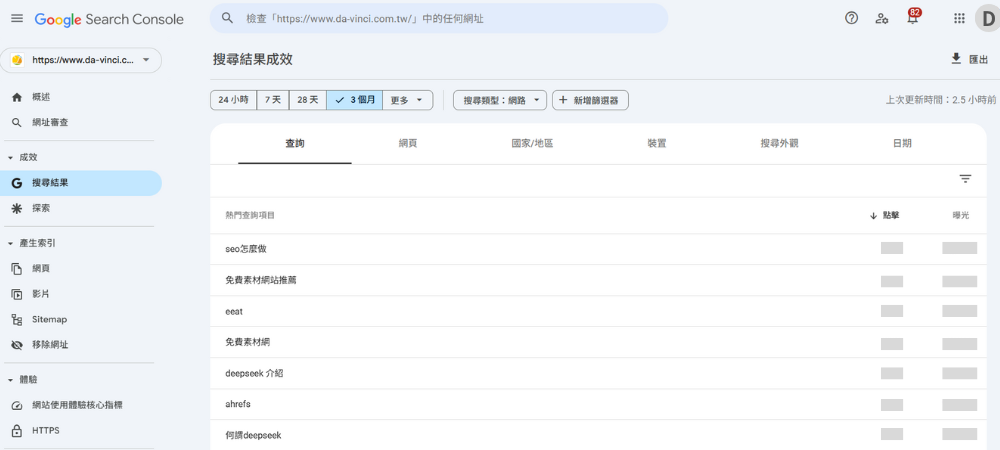
Running a website isn't just about guessing keywords. Google Search Console (GSC) provides the most accurate data, telling you "which words users actually search for to reach your site." By analyzing impressions and clicks data provided by Google Search Console, you can identify the keywords that bring in real traffic, further optimize your website content, and improve your website's ranking in Google search results.
<Further Reading: How to Analyze SEO Performance Using Google Search Console (GSC)? >
Keyword planning tool features:
- View the number of impressions and clicks the website receives.
- Understand the average ranking position of keywords and analyze keyword changes over different time periods.
- Regularly check the "Query" report to discover new keyword opportunities.
- Pay attention to keywords that rank around page 2; these are the keywords most likely to be optimized to reach page 1.
- Compare the performance differences between mobile devices and desktop devices.
Keyword Tools 5. Google Ads Keyword Planning Tool
- Find new keywords and assess the competitiveness of existing keywords.
- Use it for free; pay for advertising for more accurate data ( Go now )
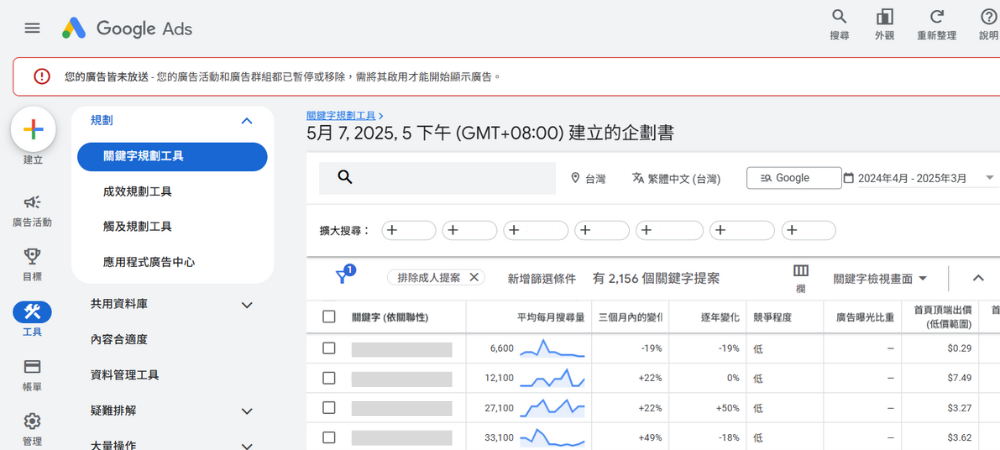
While Google Ads is primarily used for running Google ads, it has a built-in "keyword planning tool" that provides data such as monthly search volume range, competition level, related keyword suggestions, and bid estimates for keywords. This is of great reference value for SEO strategy keywords and can help you to have a more comprehensive understanding of market demand and keyword competition.
The free version provides the monthly search volume range (e.g., 1K-10K) and competition level for keywords. If your Google Ads account happens to be running ads, you can also unlock more accurate average monthly search volume data (as shown in the image above).
Further Reading: Google Ads Keyword Planning Tool Tutorial
Keyword planning tool features:
- Data provided by Google is more accurate and offers more comprehensive keyword suggestions.
- Clearly understand the competition level of each keyword (highly competitive keywords may require more strategic resources to rank).
Keyword Tool 6. Ahrefs
- The most comprehensive professional SEO analysis tool
- The free version has limited features; the paid version starts at $29 USD per month ( Go now )
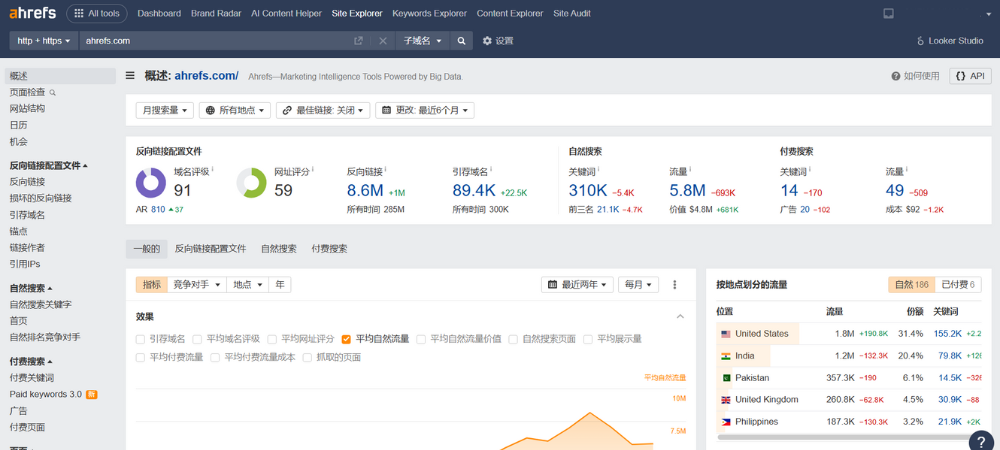
Ahrefs is widely recognized as the most powerful SEO tool in the industry. There is a free version, but its functionality is limited. If you need to deeply analyze competitors' keywords, manage multiple or large websites, or comprehensively optimize SEO, the paid version is recommended. Although the basic version costs $129 per month, which may be a considerable expense for small businesses or individuals, its potential to increase website traffic and optimization results is definitely a high-return investment.
<Further Reading: Ahrefs Tutorial Guide: Understand the SEO Tool Ahrefs in One Article! >
Keyword planning tool features:
- Thousands of related keyword suggestions.
- Keyword Difficulty (KD) Score.
- Provides search volume data and click-through rate estimates.
Other features:
- Analyze competitors' traffic sources and top-performing keywords.
- Reverse link analysis.
- Monitor keyword ranking changes.
- Historical ranking data.
Keyword Tool 7. Yoast SEO
- The most used SEO analysis tool on WordPress
- Free to use
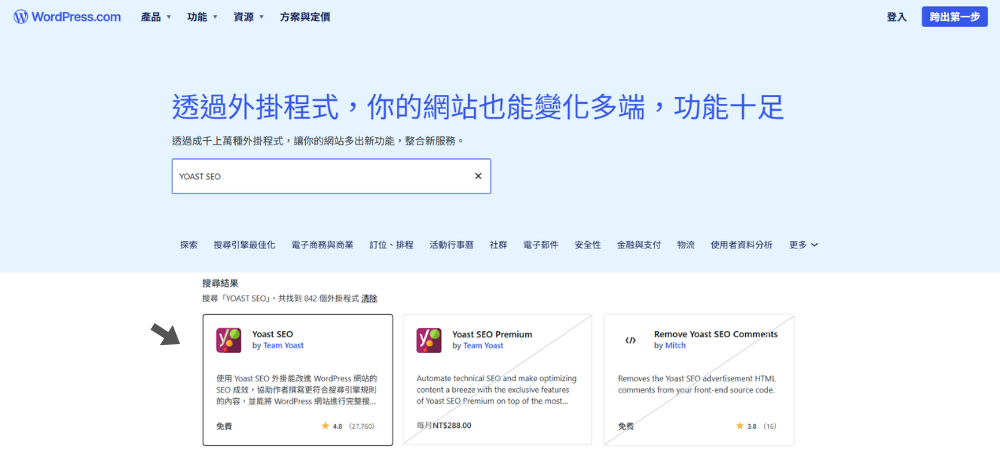
For those using WordPress as their website, the free Yoast SEO plugin is like your website's SEO guide. In addition to providing keyword optimization suggestions, it can also comprehensively check whether your website meets SEO standards. Through a simple and easy-to-understand red, yellow, and green light rating system (red light: needs immediate correction, yellow light: can still be improved, green light: good condition), it helps you adjust content, optimize keyword layout, and ensure a good reading experience for users, making your website easier for search engines to find.
<Further Reading: Ahrefs Tutorial Guide: Understand the SEO Tool Ahrefs in One Article! >
Keyword planning tool features:
- Check if the keywords appear in important positions (title, first paragraph, etc.).
- Assess whether the keyword density is appropriate.
- Suggestions for using relevant keywords.
- Provide content structure suggestions.
Friendly reminder:
- There's no need to excessively pursue "green lights" (which perfectly aligns with Yoast's advice); keep the content natural.
- Combine keyword research with other tools and update regularly to get the latest features.
Keyword Tool 8.
- A tool that can generate a large number of keywords based on platform, location, and language.
- The free version has limited features; the paid version starts at $69 USD per month ( Go now )
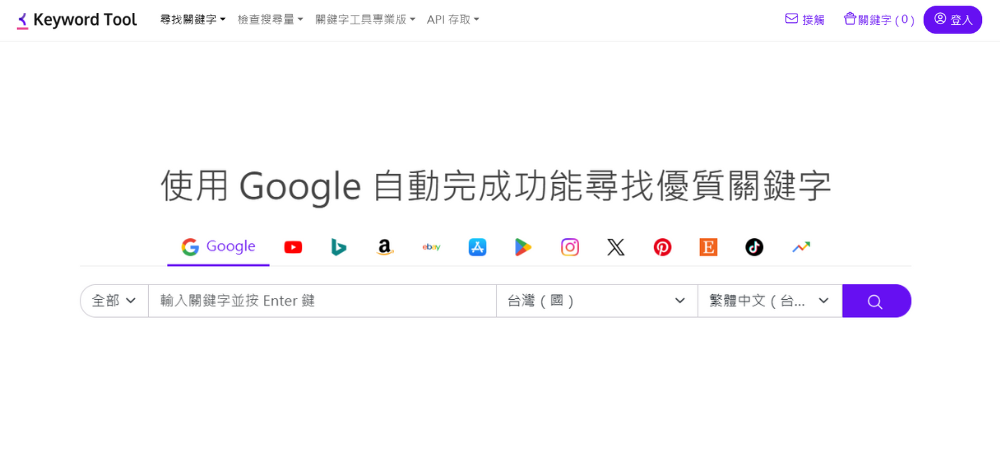
Keyword Tool can be considered an upgraded version of Google Ads' keyword planning tool. After entering keywords, the free version can provide hundreds of relevant keywords, while the paid version provides more in-depth analysis of search volume, trends, average cost per click, and competition level. Most notably, it can search for keywords based on different platforms, such as Google, YouTube, Bing, Instagram, TikTok, etc., making it ideal for marketers who need to develop SEO optimization strategies for different platforms.
Keyword planning tool features:
- Several related keywords are generated based on the seed keyword.
- Tailoring keywords to different platforms allows for more precise targeting of the audience and improves SEO optimization effectiveness.
- Clearly understand the competition level of each keyword (highly competitive keywords may require more strategic resources to rank).
Keyword Tool 9. Keyword Sheeter
- The fastest keyword generation tool
- Use for free (Go now)
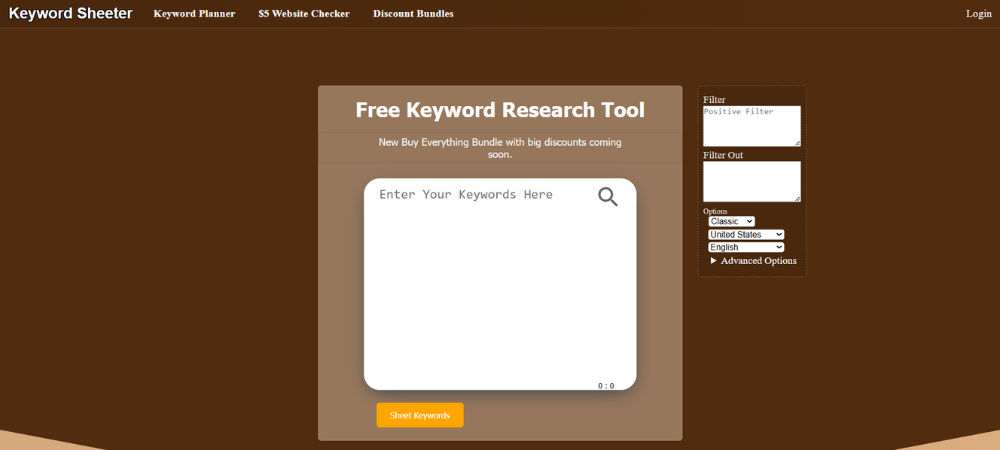
Want to quickly integrate more keywords? Keyword Sheeter claims to generate thousands of relevant keywords per minute and supports multiple languages including Traditional Chinese. Although it lacks traffic and trend analysis, its unique "positive and negative filters" can effectively focus on or exclude specific words, making it very suitable for large websites or content farms to quickly build keyword lists in the initial conception and long-tail keyword planning stages.
Keyword planning tool features:
- Extremely high-speed keyword generation, with list export functionality.
- Based on Google's automatic suggestions
- The interface is simple and intuitive, making it easy to use.
Keyword Tool 10. Keyword Surfer
- Chrome extension for instantly viewing keyword search volume
- Use for free ( Go now )
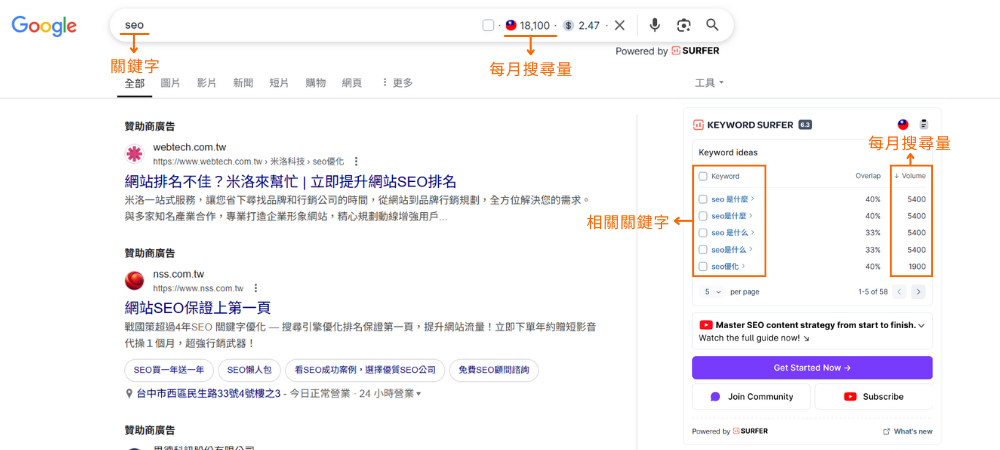
Keyword Surfer is a free Google Chrome extension that lets you easily track keyword search volume in different regions without leaving the Google search page. Once installed, Keyword Surfer automatically displays the search volume for your main keywords whenever you search on Google, and provides a series of related keyword suggestions on the right to help you quickly understand market demand and optimize your SEO content strategy.
Keyword planning tool features:
- The search results page displays the monthly search volume for the keywords.
- Provide relevant keyword suggestions
- Collect keyword data during routine searches
How to choose the right keyword tool for you?
With so many options, how do you decide which tools to use? Here are a few factors to consider, and we have different recommendations for each.Budget considerations:
- Recommended free options: Google related tools, Keyword Surfer
- Mid-range paid recommendation: Ahrefs basic solution
- Recommended for businesses: Ahrefs Advanced Solution, other professional tools
User goals:
- For beginners: Start with free tools (Google Search Engine, Google Trends, Keyword Surfer).
- Content creators: Combining social media observation with Keyword Tool.
- Professional SEOs: Use Ahrefs + Google Search Console for in-depth analysis.
- Advertisers: Google Ads keyword planning tool + Google Trends trend monitoring.
Advanced techniques for using keywords
Having mastered the keyword tools above, how can we further utilize these keywords? For example, by adding "long-tail keywords," we can use more specific terms to attract genuinely interested potential customers. This not only makes them easier to find but also increases conversion rates. Simultaneously, we should delve into the users' search intent: are they simply looking for information? Do they want to know where to buy? Or are they already ready to place an order? Tailor your website content to their needs and add clear calls to action (CTAs) to make it easier for them to take the next step, such as placing an order, leaving a message, or contacting us.Observing which keywords competitors are using and how they create website content is actually a great way to learn quickly. Learn what they do well and incorporate it into your own website. If you can also learn from relevant foreign websites and apply it to your own website before your competitors do, you will have an even greater advantage.
<Further Reading: How to Choose SEO Keywords? Selection Techniques Revealed! Marketing Companies Do It This Way! >
Common mistakes in keyword planning
When optimizing website content, user experience should always be the top priority. Subtly integrate keywords without being overtly obvious, ensuring a natural tone. Adjust content or add long-tail keywords based on user needs to truly resonate with them. It's recommended to use multiple keyword tools for cross-validation for more accurate data. Finally, don't forget to update keywords regularly; continuous content optimization is key to improving website ranking.Comparison Table of Top 10 Free Keyword Planning Tools
| Tool Name | cost | Main features | Advantages and disadvantages |
|---|---|---|---|
| Google search engine | free | Provide search suggestions, related searches, Others also searched for the following items | ✔ Reflects actual user search behavior ✖ No search volume data, limited functionality |
| Community, News Media, Forum | free | Discover trending keywords and observe audience needs | ✔ Reflects the actual needs of the audience ✖ Requires manual data collection, lacks quantifiable data |
| Google Trends | free | Analyze keyword popularity changes and seasonal trends | ✔ Compare the relative popularity of keywords ✖ No precise search volume or competition level |
| Google Search Console | free | Keyword performance, exposure, and click data for our own website | ✔ Discover new opportunities based on actual website performance ✖ Data from private websites only |
| Google Ads Keyword planning tool | Free/Paid (Advertising data is preferred) | Precise search volume data and competition level assessment | ✔ Provides search volume range and competition level ✖ Free version data is inaccurate and requires a Google Ads account |
| Ahrefs | Free/Paid (Starting from $29 USD per month) | Comprehensive SEO analysis, keyword difficulty score, competitor research | ✔ Comprehensive data and professional SEO features ✖ Higher price and more difficult to operate |
| Yoast SEO | free | WordPress content optimization, keyword suggestions, readability check | ✔ WordPress integration and real-time content optimization suggestions ✖ WordPress only, basic functionality |
| Keyword Tool | Free/Paid (Starting from $69 USD per month) | Generate keywords based on different platforms to accurately reach the target audience. | ✔ Multiple platforms, locations, and languages available ✖ Limited features in the free version |
| Keyword Sheeter | free | High-speed keyword generation, supports forward and reverse filtering | ✔ Generates keywords quickly ✖ No search volume or competition data |
| Keyword Surfer | free | Real-time display of search volume data and related keyword suggestions | ✔ Easy to use, instantaneous ✖ Lower data accuracy, limited functionality |
in conclusion
Choosing the right keyword tools is only the first step in SEO. Ultimately, a website's success in search engine rankings depends on a comprehensive SEO plan and continuous optimization. Da Vinci Digital boasts years of experience in website design and SEO practice, deeply understanding the impact of website architecture on rankings. We can tailor a customized SEO strategy for your industry, from keyword, content, and structure optimization to continuous monitoring and adjustments, helping you stand out in search engines. Are you looking for a professional SEO partner to help your website achieve better search engine rankings? Contact us and let us create a successful strategy tailored to your needs.Further Reading: Top 10 SEO Companies in Taiwan (2025 )
(This article is the property of Dauriac and may not be reproduced with images or text.)
You may be interested


Love to explore and try new things, and use words to record inspiration and new discoveries in life
Recommended topics
Top Charts
All articles
article keywords
Subscribe to newsletter
article outline
You may be interested